How To Use PhysiKey
Get up and running in under 5 minutes. Follow these steps to install and activate PhysiKey on your iPad.
Installation & Setup
Download PhysiKey from the App Store
Search for 'PhysiKey' in the App Store on your iPad, or tap the Download button below. PhysiKey is available for iPad running iOS 14 or later.
Make sure you're on your iPad — PhysiKey is optimized for iPad and is not available for iPhone.
Enable PhysiKey in iPad Settings
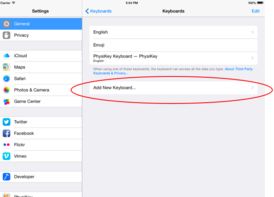
After installing, you need to add PhysiKey as a keyboard in your iPad's Settings app.
You do not need to enable Full Access. PhysiKey works without it and does not transmit any keystrokes.
Start Typing with PhysiKey
Open any app with a text field and tap to bring up the keyboard. You'll see PhysiKey's medical symbols and shorthand keys ready to use.
Your privacy is protected. PhysiKey never logs, stores, or transmits your keystrokes.
Switch to PhysiKey While Typing
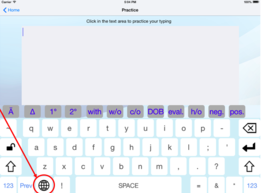
Tap and hold the globe icon (🌐) in the bottom-left corner of the keyboard, then select PhysiKey from the list. You can also tap the globe icon to cycle through your keyboards.
Set PhysiKey as your first keyboard in Settings so it loads by default whenever you open a text field.
Pro Tips
Reorder Your Keyboards
In Settings → Keyboards, drag PhysiKey to the top of the list so it loads first by default.
Works in Your EMR
PhysiKey works in any app with a text field — including web-based EMR systems accessed through Safari.
Switch Back Quickly
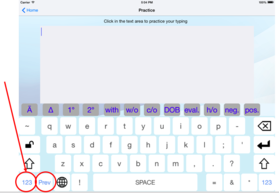
Tap the globe icon once to cycle back to your standard keyboard whenever you need it.
No Internet Required
PhysiKey works fully offline — no network connection needed for any keyboard functionality.
Ready to Get Started?
Download PhysiKey now and start charting faster today.